<feed xmlns="http://www.w3.org/2005/Atom"><title>Some unrelated thoughts</title><link href="https://www.pending.io/feed.xml" rel="self"/><link href="https://www.pending.io/"/><updated>2026-01-25T13:46:12+00:00</updated><id>https://www.pending.io/</id><author><name>Enrico Tröger</name><uri>https://www.pending.io/</uri></author><entry><title type="html">The fancy new AI world</title><link href="https://www.pending.io/blog/the-fancy-new-ai-world/"/><id>https://www.pending.io/blog/the-fancy-new-ai-world/</id><author><name>Enrico Tröger</name><uri>https://www.pending.io/</uri></author><published>2026-01-25T13:46:12+00:00</published><updated>2026-01-25T13:46:12+00:00</updated><content type="html"><![CDATA[<p>In the last few years, many people are talking about and using artificial intelligence (AI) a lot.
Especially in the IT and software developing sector it is a huge thing and already starts to change how people work and maybe even think.</p>
<p>It is impressive what you could do with the current available AI solutions nowadays.</p>
<p>But is it all cool and safe to use? <br>
Do we know enough about that new technology? <br>
Does anyone on this planet really knows how AI works? <br>
Does our planet has the resources to power AI?</p>
<p>The following are a few examples and conclusions on why I personally did not in the past, do not currently and probably will not use AI tools.</p>
<h3 id="how-it-is-changing-our-work">How it is changing our work</h3>
<p>From what I see some people already adopted AI tools to change how they get their work done, especially in software development:</p>
<ol>
<li>Some use AI chatbots as sparring partner to develop or validate new ideas, solution attempts and so on.</li>
<li>Others use AI tools to generate code parts or even whole code bases and review the generated code afterwards.</li>
<li>There are also specialised AI models to review existing code and give hints about improvements.</li>
<li>Let AI generate unit tests for your code base and surely even more</li>
</ol>
<p>Especially variant 2. is worrying: <br>
Me and probably most developers prefer to write code to reviewing code. Still code reviews are very important and a
mandatory part of any software development. But if the &ldquo;fun&rdquo; part of writing code is done by an AI tool and a
software developer&rsquo;s primary task is to review generated code, I wonder how satisfying this will be.</p>
<p>More importantly, if I imagine less experienced developers and career entrants mainly work this way, how should they get experience in software development?
The primary competence needed for code reviews is experience.</p>
<p>I wonder how software developers should gain the necessary experience when they do not develop software any longer.</p>
<p>Software development is so much more than just writing code, it is about finding solutions, discussing different approaches for a given problem, debugging unknown behaviours, understanding existing code bases and so much more.
AI might help in all of these areas but if at all, it should be a tool to help us. I am sure we will fail if we use it to replace human developers completely.</p>
<p>We should always be aware the current AI tools are rather error prone and we can never trust blindly any result of an AI tool.
People who understand AI models better than me assume that based on the way current AI models work, they will never
be free of mistakes or wrong results, e.g. the various forms of hallucinations.</p>
<p>My conclusion: will it help at all if AI tools take the parts of our work which we like to do and what remains is to
question and review every result it got to ensure that the AI model did not introduce new security risks, bugs or unwanted features in general.</p>
<h3 id="data-used-to-train-the-models">Data used to train the models</h3>
<p>It is probably known that AI models need a lot of training to get any reasonable result.
Those training requires huge amounts of data.</p>
<p>We know only a little where those data came from.
What we know is that AI companies used illegal downloads of copyrighted work to train their AI models.
This is something every individual would be sued for but big tech AI companies just do it and nobody really cares.</p>
<p>Also, it is known that some AI companies are continuously scraping the web for new content to train their models.
This is nothing bad per se but given how aggressively they crawl websites and what consequences this cause for website operators,
in terms of traffic costs but also reachability, cannot be anything we as society want to tolerate.
They ignore or even counter-fight common anti crawling techniques like <code>robots.txt</code>.</p>
<h3 id="privacy">Privacy</h3>
<p>Most of the commonly used AI tools are provided by US big tech companies and to effectively use them you need to register, I do not know but I assume you need to provide your real data.
Once you are logged in to chat with the AI or use it in another way, the company knows who you are, what you use the AI model for and they can even log and evaluate all the
queries you sent to the AI model.
Whether they actually do this or not, you never know and there is no way to be really sure.</p>
<p>Furthermore, as far as I know, most providers offer an option to opt-out from using <strong>your</strong> data for training the AI model.
But why it is an opt-out instead of opt-in in the first place? And then, you have to trust the company that they really do. How can anyone build that trust into companies which are ran by billionaires in a country with a more and more non-democratic regime.</p>
<p>This is especially critical if people &ldquo;discuss&rdquo; quite sensitive topics with the AI model like health or financial issues.
But it is also relevant for software developers. Usually, to be able to give you any reasonable result in coding tasks, the AI model need to know about the context, about your requirements or
even need access to your existing code base at all (think of code reviews or adding new features).</p>
<p>I personally would never share my ideas or code with an AI model ran by anyone I do not know and I cannot trust in any way.
Additionally, even if the US companies could be trustworthy, they are still subject to US laws which enforce them to share their data with the US administration on request (see Cloud Act).</p>
<h3 id="ai-versus-climate-crisis">AI versus climate crisis</h3>
<p>The use of AI models requires a lot of computing resources and so it requires huge amounts of energy and water for operating and cooling of data centres. The necessary training of AI models consumes even more energy.</p>
<p>To satisfy the enormously increased energy consumptions, the US government as well as some US AI companies are planning to build new nuclear power plants and are about to re-activate old, already deactivated nuclear power plants. At the same time, the US government repeatedly tries to stop building new renewable energy plants like off-shore wind power plants.</p>
<p>Why on earth? <br>
What is wrong with them?</p>
<p>The ongoing global climate crisis will change our all lifes and at first the lifes of those who rather cannot use the new fancy AI stuff at all (global south). Rich US and European people might be able to handle that crisis a bit longer than others because they luckily live in an area of the planet where the consequences might happen a bit later and they have much more money to save themselves. Though in the end, we all have to deal with the consequences of destroying our planet constantly.</p>
<p>xAI powers some of their data centres with mobile methane gas turbines which are meant as temporary power sources for emergencies. They use them stationary. Those mobile power stations produce more emission than usual gas turbine power plants. It took more than a year until the Environmental Protection Agency action declared that use of mobile gas turbines as illegal.</p>
<p>In addition to the necessity of building new power plants, new  electric power lines have to been built as well to transport the energy from the power plants to the data centres. Such costs are usually paid by end customers via the electricity bill.
So even if people do not use AI, they will pay for it.</p>
<p>I wonder how people deal with the conflict that we already are acting way too little against the clime crisis and at the same time we use a new technology like AI which requires a lot of additional energy we basically do not have for a rather little outcome. Really how?</p>
<h3 id="conclusion">Conclusion</h3>
<p>In my opinion, the negative aspects of AI in its current form in 2026 predominate the rather little productive outcome.
I see that it is fun and nice for many people to &ldquo;play&rdquo; around with this technology and that it might seem to help solving problems, at a first glance.</p>
<p>But is it worth? - For me not.</p>
<p>Maybe I will regret this in a few years when the whole (IT) world only uses AI and everyone not having ten years experience in heavy AI usage will be lost.</p>
<p>But there are still all those downsides and especially the huge energy requirements. I will be happy to revise my decision once there is a solution so
that AI will not actively destroy our planet.</p>
<p><br>
 </p>
<p><em>Disclaimer</em>: all of the above are my personal opinions based on my experience and what I read about AI and its use on various news sources.
You do not need to agree with me but feel free to contact me for corrections or general discussing the topic.</p>
<p><em>Disclaimer 2</em>: this text is written by me, manually and you might have guessed, without any AI involved including all mistakes and used em dashes.</p>
]]></content></entry><entry><title type="html">Network connectivity issues using Hotspot in Android 15 with VPN</title><link href="https://www.pending.io/blog/android-15-hotspot-vpn/"/><id>https://www.pending.io/blog/android-15-hotspot-vpn/</id><author><name>Enrico Tröger</name><uri>https://www.pending.io/</uri></author><published>2025-05-03T12:34:30+00:00</published><updated>2025-05-03T12:34:30+00:00</updated><content type="html"><![CDATA[<p>When being en route or traveling around, I often use Android&rsquo;s Hotspot feature to connect my
notebook to the outside world.</p>
<p>This worked completely fine for the last years.</p>
<p>Since the update to Android 15 (or maybe Android 14 I cannot say for sure), connecting to the
Hotspot worked but almost all websites stopped loading. Fetching emails via IMAP worked but
basically everything based on HTTPS resulted in timeouts or at best in partial loads after a long
time.</p>
<p>After a lot of searching in the net and debugging the network on my notebook, I finally found the
solution: the MTU.</p>
<p>So I reduced the <strong>MTU</strong> from the default <strong>1500</strong> to a little lower value of <strong>1440</strong> and all of my
network problems are gone when using the Hotspot.</p>
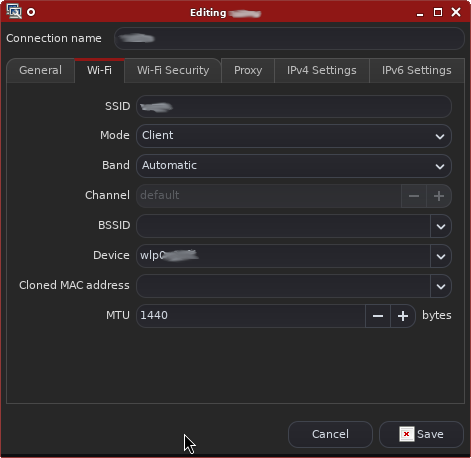
<p>If you are using NetworkManager, it&rsquo;s easy to change the MTU in the connection edit dialog:</p>
<p><img src="/media/nm_connection_edit.png" alt="NetworkManager connection edit dialog" title="NetworkManager connection edit dialog"></p>
<p>I didn&rsquo;t find what changed in the Hotspot setup between Android 13, 14 and 15 but reducing the MTU
was enough to fix it.</p>
]]></content></entry><entry><title type="html">Optimize LEDs on Freifunk routers</title><link href="https://www.pending.io/blog/optimize-leds-on-freifunk-routers/"/><id>https://www.pending.io/blog/optimize-leds-on-freifunk-routers/</id><author><name>Enrico Tröger</name><uri>https://www.pending.io/</uri></author><published>2019-01-26T12:49:42+00:00</published><updated>2019-01-26T12:49:42+00:00</updated><content type="html"><![CDATA[<p>This is about the default configuration of the LEDs on
router devices with the Freifunk / Gluon firmware (<a href="https://www.freifunk.net">https://www.freifunk.net</a>).
For example, on my &ldquo;TP-Link TL-WR841N/ND v9&rdquo; the WAN and wifi LEDs are
constantly blinking as there is constant traffic on the according devices.
As this is by design in the Freifunk network, I&rsquo;m not interested in
the blinking. It is just distracting.</p>
<p>After I noticed that it is very simple to control those LEDs with
the Gluon firmware (actually this is thanks to the OpenWRT base),
it was just a little fun to write a script to let the LEDs show
information I want to see:</p>
<ul>
<li>LAN port LEDs are off</li>
<li>WAN LED shows whether fastd is running by checking if there is
a Freifunk gateway assigned, this is very basic check indicator
whether all is working fine</li>
<li>QSS LED shows the health of the system (memory, disk space, CPU load)</li>
<li>Wifi LED shows whether any clients are connected</li>
</ul>
<p>To lower distracting, the WAN and QSS LEDs are off by default and are
only set to blinking mode if there is something wrong.
The wifi LED glows constantly as long as there is at least client
connected to the Freifunk network.</p>
<p>The health checks for the QSS LED consist of:</p>
<ul>
<li>CPU load below 0.8</li>
<li>At least three MB of memory available</li>
<li>NVRAM usage is not above 85%</li>
</ul>
<p>Once any of this checks fails, the LED is set to blinking.</p>
<p>After all, this results in a device with no blinking LEDs
if everything is fine and ideally two LEDs constantly glowing
(Power and wifi).</p>
<p>The script can be found on <a href="https://github.com/eht16/freifunk-scripts/tree/master/set_led_status">github.com/eht16/freifunk-scripts/</a></p>
<p>To disable all controllable LEDs by default, use the following commands
(need to be done only once):</p>
<pre><code>uci set system.led_lan1.trigger='none'
uci set system.led_lan1.default=0
uci set system.led_lan2.trigger='none'
uci set system.led_lan2.default=0
uci set system.led_lan3.trigger='none'
uci set system.led_lan3.default=0
uci set system.led_lan4.trigger='none'
uci set system.led_lan4.default=0
uci set system.led_wlan.trigger='none'
uci set system.led_wlan.default=0
</code></pre>
<p>Finally, add a cronjob to run it periodically:</p>
<pre><code>1,3,5,7,9,11,13,15,17,19,21,23,25,27,29,31,33,35,37,39,41,43,45,47,49,51,53,55,57,59 * * * * /bin/sh /etc/set_led_status.sh
</code></pre>
<p>Put this line in /usr/lib/micron.d/set_led_status (this is the only supported location
for cronjobs on Gluon and <code>micrond</code> does not support <code>*/2</code>).</p>
<p>Disclaimer: tested only on TP-Link TL-WR841N/ND v9 but should also work
on similar devices.</p>
<p>Happy (no longer) blinking!</p>
]]></content></entry><entry><title type="html">No more Compulsory Routers - Routerfreiheit bei NetCologne</title><link href="https://www.pending.io/blog/no-more-compulsory-routers/"/><id>https://www.pending.io/blog/no-more-compulsory-routers/</id><author><name>Enrico Tröger</name><uri>https://www.pending.io/</uri></author><published>2016-09-08T00:00:30+00:00</published><updated>2016-09-08T00:00:30+00:00</updated><content type="html"><![CDATA[<p>tl;dr: this post is about the free choice of routers to be used on home broadband connections in Germany.
Since August 1st, a new law enables customers to receive credentials for the DSL connections
as well as for VoIP services in order to use end devices (i.e. routers) of their choice.
Since all of the following information are specific to one German local provider, NetCologne,
the rest of the post is in German.</p>
<h3 id="schritt-1-anfragen-der-zugangsdaten">Schritt 1: Anfragen der Zugangsdaten</h3>
<p>Laut dem neuen Gesetzt sollen Neukunden die Zugangsdaten unaufgefordert vom Anbieter erhalten.
In meinem Fall handelt es sich um einen bestehenden Vertrag seit 2010 und daher habe ich explizit
bei <a href="https://www.netcologne.de/">NetCologne</a> die Zugangsdaten angefragt.
Man benötigt hierbei zwei Arten von Zugangsdaten: für die DSL-Verbindung zum Internet und für die
VoIP-Telefonie zum Telefonieren.
Das Beantragen der Daten hat bei mir ganz einfach via Kontaktformular auf netcologne.de funktioniert.
Nach einem Tag konnte ich unter <a href="https://einstellungen.netcologne.de/">https://einstellungen.netcologne.de/</a> meine VoIP-Zugangsdaten einsehen
und auch das Passwort ändern.</p>
<p><strong>Allerdings</strong>: bei den DSL-Zugangsdaten wurden die alten Zugangsdaten ersetzt und die neuen via
Post zugeschickt. Die Bestätigung darüber erhielt ich an einem Mittwoch, die Zugangsdaten wurden
am darauf folgenden Donnerstag morgen geändert, der Brief kam allerdings erst am Dienstag.
NetCologne hat den Brief laut Stempel an dem genannten Donnerstag verschickt,
allerdings hat es wohl bei dem Brief-Dienstleister &ldquo;postcon&rdquo; etliche Tage gedauert um wenige hunderte Meter
Luftlinie zwischen Provider und meiner Adresse zurückzulegen. In der Zeit war mein Anschluss aber
offline, da die alte Netconnect-Box von NetCologne die neuen Daten genauso wenig kannte wie ich.
Wenn man etwas Geduld hat, kann man bei der Hotline anrufen und auch dort die neuen Zugangsdaten
erfragen.</p>
<p>Sonst muss man noch wissen, dass bei NetCologne die DSL-Verbindung und die VoIP-Telefonie in zwei
getrennten VLans realisiert ist. Das ist VLan 10 für DSL und VLan 20 für VoIP.
Diese Daten findet man unter: <a href="https://www.netcologne.de/selbsteinrichten/vdsl">https://www.netcologne.de/selbsteinrichten/vdsl</a>.</p>
<h3 id="schritt-2-test-mit-fritzbox-7490">Schritt 2: Test mit FRITZ!Box 7490</h3>
<p>Das Einrichten der <a href="https://avm.de/produkte/fritzbox/fritzbox-7490/">FRITZ!Box 7490</a> geht eigentlich recht einfach.
Als Technik-begeisterter Mensch habe ich direkt am Anfang in der FRITZ!Box die
&ldquo;Erweiterte Ansicht&rdquo; aktiviert (rechts oben). Eventuell fehlen in der normalen
Ansicht einige Einstellungen.</p>
<h4 id="dsl">DSL</h4>
<p>Zuerst wählt man im Einrichtungsassistent als Internetanbieter &ldquo;NetCologne / NetAachen&rdquo; und als
Verbindungstyp &ldquo;NetCologne / NetAachen VDSL-Anschluss&rdquo; aus.</p>
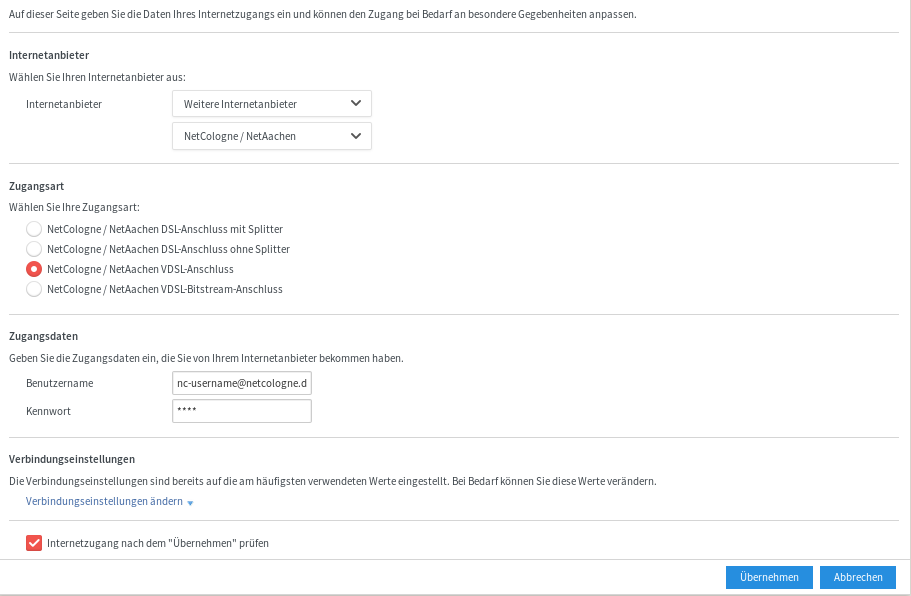
<p>Später kann man unter &ldquo;Internet / Zugangsdaten&rdquo; die oben erhaltenen Zugangsdaten für die DSL-Verbindung
angeben. Dann sollte auch direkt der Internetzugang bereits funktionieren.
Die angesprochenen VLan-Besonderheiten sind hier bereits vorkonfiguriert durch die Auswahl des Internetanbieters.</p>
<p><a href="/media/fritzbox/fritz_dsl.png"><img src="/media/fritzbox/fritz_dsl_small.png" alt="FRITZ!Box DSL Einstellungen" title="FRITZ!Box DSL Einstellungen"></a></p>
<h4 id="voice-over-ip--telefonie">Voice-over-IP / Telefonie</h4>
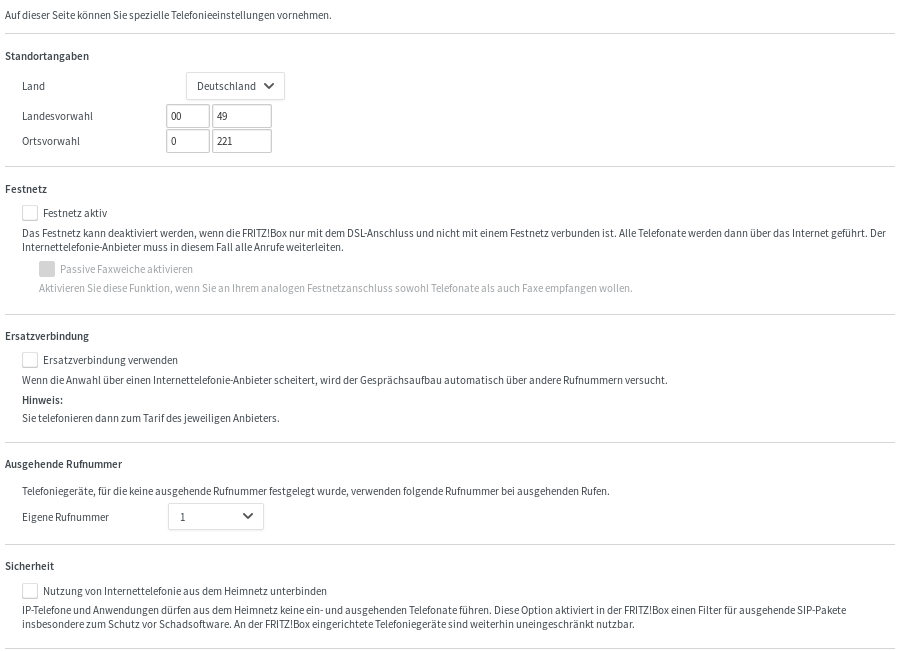
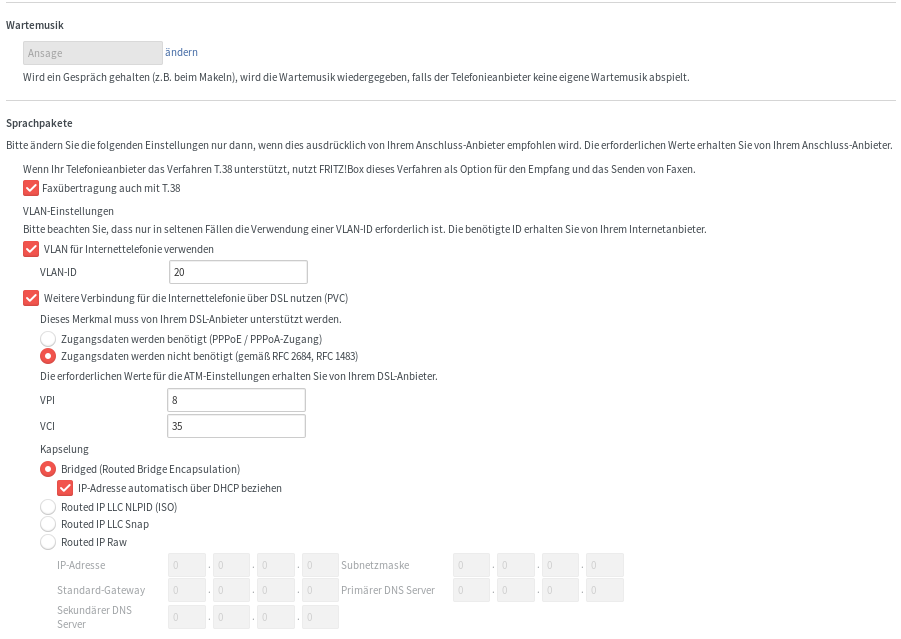
<p>Für die Telefonie richtet man zuerst die Anschlusseinstellungen ein.
Hier habe ich überwiegend die Voreinstellungen übernommen und den Rest durch Trial&amp;Error ausprobiert.
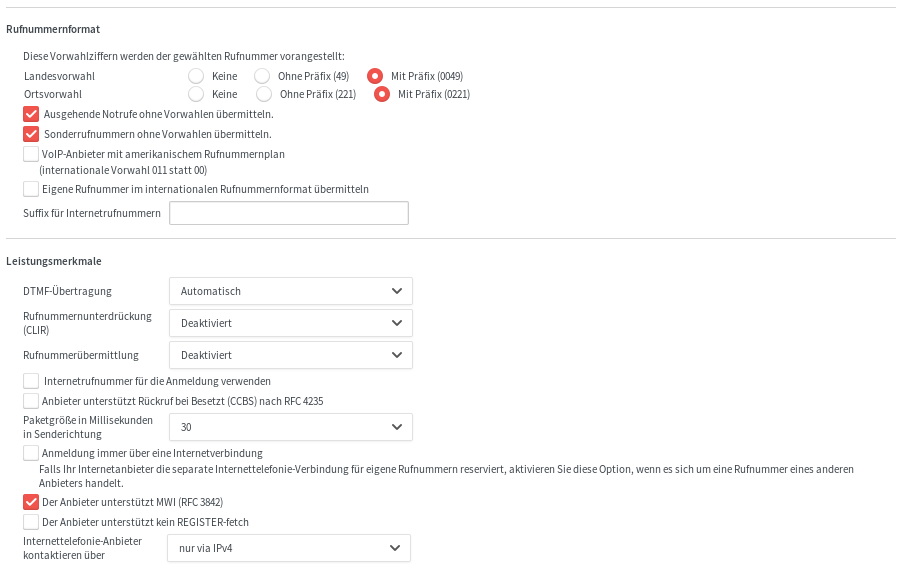
Die Screenshots zeigen alle relevanten Einstellungen.
Wichtig ist hier die VLan-ID 20, sollte sie nicht schon vorausgewählt sein.</p>
<p><a href="/media/fritzbox/fritz_sip_anschluss_1.png"><img src="/media/fritzbox/fritz_sip_anschluss_1_small.png" alt="FRITZ!Box SIP Anschluss Einstellungen" title="FRITZ!Box SIP Anschluss Einstellungen"></a>
<a href="/media/fritzbox/fritz_sip_anschluss_2.png"><img src="/media/fritzbox/fritz_sip_anschluss_2_small.png" alt="FRITZ!Box SIP Anschluss Einstellungen" title="FRITZ!Box SIP Anschluss Einstellungen"></a></p>
<p>Danach geht es daran, eine Telefonnummer einzurichten.
Die Einstellungen hier sind alle nur für &ldquo;analoge Telefonie&rdquo;, auch wenn es das so ja nicht mehr gibt mit VoIP.
Meine damit, mein Anschluss unterstützt kein ISDN, daher sind auf den Screenshots nur die Einstellungen
für nicht-ISDN-Anschlüsse und damit auch nur für eine Nummer zu sehen.</p>
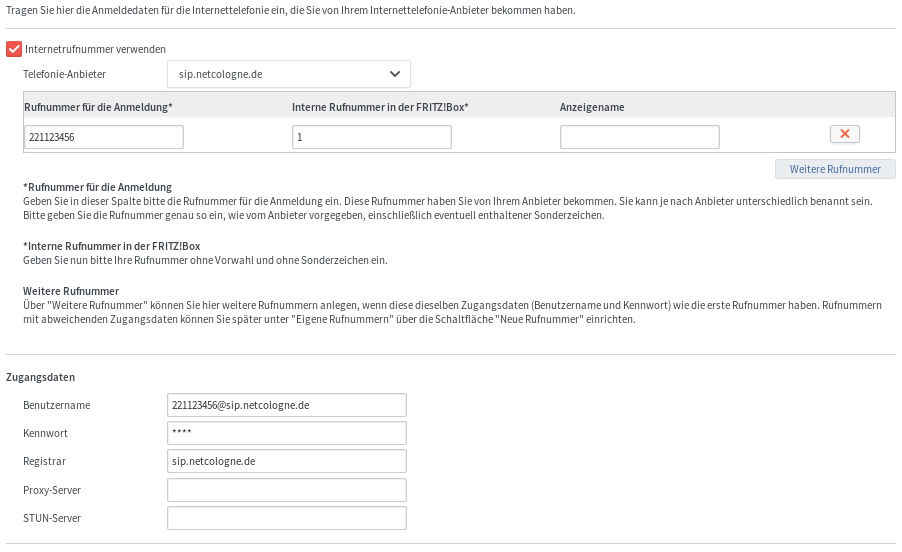
<p>Als &ldquo;Telefonie-Anbieter&rdquo; habe ich &ldquo;anderer Anbieter&rdquo; ausgewählt, da kein passender in der Liste vorhanden war.
Später wird dort als Name automatisch dann &ldquo;sip.netcologne.de&rdquo; angezeigt.</p>
<p><a href="/media/fritzbox/fritz_sip_nummer_1.png"><img src="/media/fritzbox/fritz_sip_nummer_1_small.png" alt="FRITZ!Box SIP Nummern Einstellungen" title="FRITZ!Box SIP Nummern Einstellungen"></a>
<a href="/media/fritzbox/fritz_sip_nummer_2.png"><img src="/media/fritzbox/fritz_sip_nummer_2_small.png" alt="FRITZ!Box SIP Nummern Einstellungen" title="FRITZ!Box SIP Nummern Einstellungen"></a></p>
<p>Damit sollte der Telefonie nichts mehr im Wege stehen.
Sollten irgendwo Probleme auftreten, findet man im Ereignisprotokoll vielleicht nützliche Hinweise.</p>
<h3 id="schritt-3-finales-setup-mit-vdsl-modem-und-raspberry-pi">Schritt 3: Finales Setup mit VDSL-Modem und Raspberry Pi</h3>
<p>Das oben beschriebene Setup mit einer FRITZ!Box war nur zum Testen, insbesondere bzgl. VoIP-Telefonie.</p>
<p>Mein eigentliches Ziel-Setup ist, die Netconnect-Box von NetCologne loszuwerden und als Router
einen Raspberry Pi zu verwenden, der selbst die DSL-Verbindung zum Zugang zum Internet aufbaut (via pppoe).</p>
<p>Dazu benötigt man aber so oder so ein DSL-Modem, in meinem Fall ein VDSL2-Modem.
Neugeräte findet man nur schwer auf dem Markt, aber speziell im NetCologne-Versorgungsgebiet gibt
es hin und wieder noch ältere Geräte von Zyxel. Konkret benötigt man das Modell <code>P-800 series</code>.</p>
<p>Ich hatte Glück und konnte vor kurzem ein solches Gerät in einem Kleinanzeigenmarkt finden und
für kleines Geld (fünf Euro) erstehen.</p>
<p><a href="/media/fritzbox/zyxel_p800_front.jpg"><img src="/media/fritzbox/zyxel_p800_front_small.jpg" alt="VDSL2-Modem Zyxel P-800 series" title="VDSL2-Modem Zyxel P-800 series"></a>
<a href="/media/fritzbox/zyxel_p800_back.jpg"><img src="/media/fritzbox/zyxel_p800_back_small.jpg" alt="VDSL2-Modem Zyxel P-800 series" title="VDSL2-Modem Zyxel P-800 series"></a></p>
<p>Meine Variante ist zwar eigentlich für ISDN-Anschlüsse gedacht
(erkennbar an dem <a href="http://www.manualslib.com/manual/200551/Zyxel-Communications-Vdsl2-Modem-P-870m-I-Series.html?page=2#manual">Zusatz &ldquo;-I3&rdquo; in der Modellnummer</a> auf der Rückseite),
funktioniert aber auch an meinem Anschluss ohne ISDN prima.
Solche Geräte findet man hin und wieder auch auf eBay oder eben in lokalen Kleinanzeigenmärkten.
Vielleicht sind auch andere VDSL2-Modems geeignet, wichtig dabei ist nur, dass sie die
entsprechenden VDSL-Profile unterstützen (<a href="https://www.netcologne.de/selbsteinrichten/vdsl">3</a>).</p>
<p>Das Zyxel-Modem hat einen RJ45-Anschluss für die DSL-Leitung, also Richtung TAE-Dose in der Wand
sowie einen RJ45-Anschluss zum Anschluss an einen Router.
Wie erwähnt, in meinem Fall ist der Router ein Raspberry Pi.</p>
<p>Da der Pi nur einen Ethernet-Port hat, mache ich mir zu Nutze, dass bei PPPoE eben die
PPP-Pakete durch normales Ethernet fließen und somit ich das DSL-Modem sowie den Pi über
einen Switch miteinander verbunden habe.
Somit geht durch den Ethernet-Port am Pi sowohl der PPP-Traffic wie auch der normale
Ethernet-Traffic ins LAN.
Bei meinem 25 MBit Anschluss reicht da die Kapazität von 100 MBit am Pi sowie auch dessen
Rechenleistung bequem aus. Bei einem 50 oder 100 MBit Anschluss von NetCologne wird es
da natürlich etwas eng und man kann faktisch nie die gesamte Bandbreite ausnutzen.</p>
<p>Zu beachten ist noch, dass die PPPoE-Pakete aus dem DSL-Modem bei NetCologne in einem
getaggten VLan mit der ID 10 unterwegs sind. D.h. der normale, in der Regel ungetaggte Traffic
im Ethernet sieht die Pakete gar nicht.
Damit der Pi die Pakete empfangen kann, muss man dort ein separates Interface mit der VLan ID
hochfahren. Unter Raspbian geht das recht einfach mit folgender Ergänzung in der Datei <code>/etc/nework/interfaces</code>:</p>
<pre><code>auto eth0.10
iface eth0.10 inet static
  address 10.0.2.1
  netmask 255.255.255.0
  vlan-raw-device eth0
</code></pre>
<p>Damit wird ein neues Interface <code>eth0.10</code> erzeugt, welches im richtigen VLan ist.
Über dieses Interface lässt man dann den <code>pppd</code> die DSL-Verbindung aufbauen.
Für die <code>pppd</code> Konfiguration kann man überwiegend die Standard-Werte für DSL-Provider
verwenden, wichtig sind folgende Einstellungen:</p>
<pre><code>plugin rp-pppoe.so eth0.10
user &quot;nc-username@netcologne.de&quot;
+ipv6 ipv6cp-use-ipaddr
</code></pre>
<p>Die erste Zeile gibt am Ende das zu verwendende Interface an, hier unser vorher erzeugtes <code>eth0.10</code>.
Die Letzte Zeile aktiviert den IPv6-Support (NetCologne bietet natives IPv6 auf Anfrage an).</p>
<p>Dann folgt noch ein Eintrag in der Datei <code>/etc/ppp/pap-secrets</code> für die Zugangsdaten:</p>
<pre><code>&quot;nc-username@netcologne.de&quot; * &quot;password&quot;
</code></pre>
<p>Auf die weiteren Details bzgl. Routing und Firewall-Setup mit <code>pppd</code> und <code>iptables</code> gehe
ich hier nicht weiter ein, dazu gibt es im Netz genügend Howtos und Beispiele.</p>
<p>Da ich nicht über VoIP telefoniere, habe ich hier auch nichts auf dem PI konfiguriert.</p>
<h3 id="fazit---oder-warum-das-ganze">Fazit - oder warum das Ganze?</h3>
<p>Erfreulicherweise erhält man bei NetCologne auf Anfrage alle notwendigen Zugangsdaten und
Konfigurationshinweise (Stichwort VLans). Damit hat man tatsächlich etwas wie &ldquo;Routerfreiheit&rdquo;.</p>
<p>Nun kann man sich zu recht fragen: warum das Ganze?
Warum so viel Aufwand und Zeit investieren, nur um nach wie vor Surfen zu können.
Hier drei Argumente:</p>
<ul>
<li>nur freie Software im Einsatz (bis auf das DSL-Modem, aber das hat keine Logik)</li>
<li>keine Fernkontrolle durch den Provider mehr möglich</li>
<li>volle Kontrolle über meinen Internet-Anschluss (bzgl. Routing, Firewalling, IPv6, &hellip;)</li>
</ul>
<p>Durch die Wahl des Routers bin ich nicht mehr an das vom Provider bereitgestellte Stück Hardware
gebunden. Wobei oft die verwendete Hardware gar nicht schlecht ist, aber durch Provider-eigene
Firmware wiederum im Funktionsumfang stark beschränkt ist.
Zudem funktioniert so nicht mehr die - bei NetCologne nett genannte &ldquo;Auto-Provisionierung&rdquo; -
Fernwartung durch die Provider. Das ist ein Verfahren um die bereitgestellten Geräte aus der Ferne
zu konfigurieren und dem Kunden somit Arbeit abzunehmen. Der Standard nennt sich <a href="https://en.wikipedia.org/wiki/TR-069">TR-069</a>.
Aber es ermöglicht so eben auch dem Provider das fernzusteuernde Gerät auszulesen, die Einstellungen
zu ändern oder zurückzusetzen (mir so passiert). Noch viel schlimmer aber, somit hat der Provider
bereits einen Fuß in meinem privaten Netzwerk, den mit dem ist das Gerät zwangsläufig direkt verbunden.</p>
<p>Ich fühle mich nun etwas freier.</p>
<p>Vielen Dank an die <a href="https://fsfe.org/">FSFE</a> und weitere Aktivisten, die sich für das neue Gesetz mit viel Geduld
und Engagement eingesetzt haben.</p>
]]></content></entry><entry><title type="html">Report generator for Logstash parse failures</title><link href="https://www.pending.io/blog/report-generator-for-logstash-parse-failures/"/><id>https://www.pending.io/blog/report-generator-for-logstash-parse-failures/</id><author><name>Enrico Tröger</name><uri>https://www.pending.io/</uri></author><published>2016-04-17T14:20:23+00:00</published><updated>2016-04-17T14:20:23+00:00</updated><content type="html"><![CDATA[<p>Since quite some I&rsquo;m using <a href="https://www.elastic.co/products/logstash">Logstash</a> (actually the whole <a href="https://www.elastic.co/products">ELK stack</a>) for collecting,
enriching and storing log events from various servers and applications.</p>
<p>While Logstash is great for this job, sometimes it cannot parse some log events because
the events have an unknown formatting or my parsing rules don&rsquo;t match well enough.</p>
<p>I used to manually search for such parse failures in the stored events from time to time.
While this worked basically, it required me to remember &ldquo;ah, maybe I should have a look for
parse failures&rdquo;. This happened not that often, so sometimes I had many parse failures for a
long time although they were easy to fix.</p>
<p>Finally, I wrote a simple script  to generate a simple report of parse failures happened
in the last seven days. This script is executed as cronjob every seven days and will send
the report via email to me. <br>
Yay, now it&rsquo;s really easy: I just need to read that tiny mail with parse failures and then
decide whether I want to fix them or rather not.</p>
<p>In case anyone is interested, the script can be downloaded here: <a href="/media/logstash/report_logstash_parse_failures.py">report_logstash_parse_failures.py</a></p>
<p>Additionally, for my convenience, I set up a Saved Search in <a href="https://www.elastic.co/products/kibana">Kibana</a>:</p>
<div class="highlight"><div class="chroma">
<table class="lntable"><tr><td class="lntd">
<pre tabindex="0" class="chroma"><code><span class="lnt"> 1
</span><span class="lnt"> 2
</span><span class="lnt"> 3
</span><span class="lnt"> 4
</span><span class="lnt"> 5
</span><span class="lnt"> 6
</span><span class="lnt"> 7
</span><span class="lnt"> 8
</span><span class="lnt"> 9
</span><span class="lnt">10
</span><span class="lnt">11
</span><span class="lnt">12
</span><span class="lnt">13
</span><span class="lnt">14
</span><span class="lnt">15
</span><span class="lnt">16
</span><span class="lnt">17
</span><span class="lnt">18
</span><span class="lnt">19
</span><span class="lnt">20
</span><span class="lnt">21
</span><span class="lnt">22
</span><span class="lnt">23
</span><span class="lnt">24
</span><span class="lnt">25
</span></code></pre></td>
<td class="lntd">
<pre tabindex="0" class="chroma"><code class="language-json" data-lang="json"><span class="line"><span class="cl"><span class="p">[</span>
</span></span><span class="line"><span class="cl">  <span class="p">{</span>
</span></span><span class="line"><span class="cl">    <span class="nt">&#34;_id&#34;</span><span class="p">:</span> <span class="s2">&#34;Parse-Failures&#34;</span><span class="p">,</span>
</span></span><span class="line"><span class="cl">    <span class="nt">&#34;_type&#34;</span><span class="p">:</span> <span class="s2">&#34;search&#34;</span><span class="p">,</span>
</span></span><span class="line"><span class="cl">    <span class="nt">&#34;_source&#34;</span><span class="p">:</span> <span class="p">{</span>
</span></span><span class="line"><span class="cl">      <span class="nt">&#34;title&#34;</span><span class="p">:</span> <span class="s2">&#34;Parse Failures&#34;</span><span class="p">,</span>
</span></span><span class="line"><span class="cl">      <span class="nt">&#34;description&#34;</span><span class="p">:</span> <span class="s2">&#34;&#34;</span><span class="p">,</span>
</span></span><span class="line"><span class="cl">      <span class="nt">&#34;hits&#34;</span><span class="p">:</span> <span class="mi">0</span><span class="p">,</span>
</span></span><span class="line"><span class="cl">      <span class="nt">&#34;columns&#34;</span><span class="p">:</span> <span class="p">[</span>
</span></span><span class="line"><span class="cl">        <span class="s2">&#34;tags&#34;</span><span class="p">,</span>
</span></span><span class="line"><span class="cl">        <span class="s2">&#34;logsource&#34;</span><span class="p">,</span>
</span></span><span class="line"><span class="cl">        <span class="s2">&#34;program&#34;</span><span class="p">,</span>
</span></span><span class="line"><span class="cl">        <span class="s2">&#34;message&#34;</span>
</span></span><span class="line"><span class="cl">      <span class="p">],</span>
</span></span><span class="line"><span class="cl">      <span class="nt">&#34;sort&#34;</span><span class="p">:</span> <span class="p">[</span>
</span></span><span class="line"><span class="cl">        <span class="s2">&#34;@timestamp&#34;</span><span class="p">,</span>
</span></span><span class="line"><span class="cl">        <span class="s2">&#34;desc&#34;</span>
</span></span><span class="line"><span class="cl">      <span class="p">],</span>
</span></span><span class="line"><span class="cl">      <span class="nt">&#34;version&#34;</span><span class="p">:</span> <span class="mi">1</span><span class="p">,</span>
</span></span><span class="line"><span class="cl">      <span class="nt">&#34;kibanaSavedObjectMeta&#34;</span><span class="p">:</span> <span class="p">{</span>
</span></span><span class="line"><span class="cl">        <span class="nt">&#34;searchSourceJSON&#34;</span><span class="p">:</span> <span class="s2">&#34;{\&#34;index\&#34;:\&#34;logstash-*\&#34;,\&#34;filter\&#34;:[{\&#34;$state\&#34;:{\&#34;store\&#34;:\&#34;appState\&#34;},\&#34;meta\&#34;:{\&#34;alias\&#34;:\&#34;Parse Failures\&#34;,\&#34;disabled\&#34;:false,\&#34;index\&#34;:\&#34;logstash-*\&#34;,\&#34;key\&#34;:\&#34;query\&#34;,\&#34;negate\&#34;:false,\&#34;value\&#34;:\&#34;{\\\&#34;filtered\\\&#34;:{\\\&#34;filter\\\&#34;:{\\\&#34;terms\\\&#34;:{\\\&#34;tags\\\&#34;:[\\\&#34;_grokparsefailure\\\&#34;,\\\&#34;_jsonparsefailure\\\&#34;,\\\&#34;_log_level_normalization_failed\\\&#34;]}}}}\&#34;},\&#34;query\&#34;:{\&#34;filtered\&#34;:{\&#34;filter\&#34;:{\&#34;terms\&#34;:{\&#34;tags\&#34;:[\&#34;_grokparsefailure\&#34;,\&#34;_jsonparsefailure\&#34;,\&#34;_log_level_normalization_failed\&#34;]}}}}}],\&#34;highlight\&#34;:{\&#34;pre_tags\&#34;:[\&#34;@kibana-highlighted-field@\&#34;],\&#34;post_tags\&#34;:[\&#34;@/kibana-highlighted-field@\&#34;],\&#34;fields\&#34;:{\&#34;*\&#34;:{}},\&#34;require_field_match\&#34;:false,\&#34;fragment_size\&#34;:2147483647},\&#34;query\&#34;:{\&#34;query_string\&#34;:{\&#34;analyze_wildcard\&#34;:true,\&#34;query\&#34;:\&#34;*\&#34;}}}&#34;</span>
</span></span><span class="line"><span class="cl">      <span class="p">}</span>
</span></span><span class="line"><span class="cl">    <span class="p">}</span>
</span></span><span class="line"><span class="cl">  <span class="p">}</span>
</span></span><span class="line"><span class="cl"><span class="p">]</span>
</span></span></code></pre></td></tr></table>
</div>
</div><p>The Saved Search can be imported directly into Kibana after downloading it from here: <a href="/media/logstash/kibana_saved_search_parse_failures.json">kibana_saved_search_parse_failures.json</a></p>
<p>Happy Logging!</p>
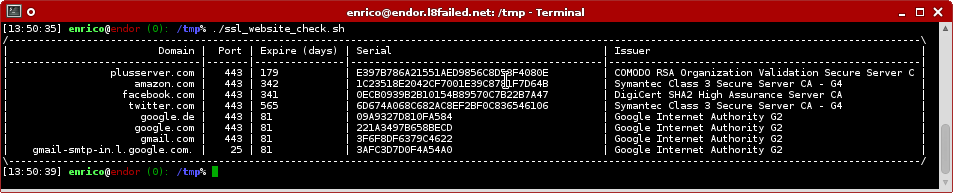
]]></content></entry><entry><title type="html">Easily check SSL certificates on websites</title><link href="https://www.pending.io/blog/easily-check-ssl-certificates-on-websites/"/><id>https://www.pending.io/blog/easily-check-ssl-certificates-on-websites/</id><author><name>Enrico Tröger</name><uri>https://www.pending.io/</uri></author><published>2016-01-23T12:55:31+00:00</published><updated>2016-01-23T12:55:31+00:00</updated><content type="html"><![CDATA[<p>Here is a simple script to quickly get an overview of the SSL certificates used on various websites,
e.g. to check expiration or issuer.
For me, this helped a lot while migrating website certificates to <a href="https://letsencrypt.org/" title="Let’s Encrypt">Let’s Encrypt</a>.</p>
<p>The script is loosely based on &ldquo;Zext ssl cert.sh&rdquo; ( see <a href="https://www.zabbix.org/wiki/Docs/howto/ssl_certificate_check">https://www.zabbix.org/wiki/Docs/howto/ssl_certificate_check</a>)
but slightly rewritten for the purpose of bulk checking and listing more deails of certificates.
The <code>openssl</code> command is required for the script to work properly.</p>
<p>After you have downloaded the script,  simply edit the domains at the top of the file to match your websites.
<code>DOMAINS</code> is an array which is to be filled with strings in the format:</p>
<pre><code>domain port [protocol]
</code></pre>
<p>Domain and port should be self-explanatory, for simple website SSL checks
use port 443 (aka https). You can also check SMTP or IMAP servers, then
use <code>smtp</code> resp. <code>imap</code> as <code>protocol</code> and <code>25</code> resp. <code>143</code> for <code>port</code>.
If you specify the <code>protocol</code> option, <code>openssl</code> will use STARTTLS for the
connection attempt.</p>
<figure><img src="/media/ssl_website_check.png"
    alt="ssl_website_check.sh in action"><figcaption>
      <h4>ssl_website_check.sh in action</h4>
    </figcaption>
</figure>

<p>Get the script on <a href="https://github.com/eht16/ssl_website_check.sh" title="https://github.com/eht16/ssl_website_check.sh">https://github.com/eht16/ssl_website_check.sh</a>.</p>
]]></content></entry><entry><title type="html">Windows binary for libgit2 0.22.2 (UPDATE: 0.23.2 available)</title><link href="https://www.pending.io/blog/windows-binary-for-libgit2-0222/"/><id>https://www.pending.io/blog/windows-binary-for-libgit2-0222/</id><author><name>Enrico Tröger</name><uri>https://www.pending.io/</uri></author><published>2015-06-05T16:28:10+00:00</published><updated>2015-06-05T16:28:10+00:00</updated><content type="html"><![CDATA[<p>I recently needed a Windows binary of libgit2 to build some <a href="https://www.geany.org">Geany</a> code against the library.
Since I could not find any reliable and trustworthy source for Windows builds of
libgit2, I had to compile it myself.
In order to save others from this, I want to publish
the result.</p>
<p>You can download the ZIP archive containing the Windows DLL library as well as
necessary C header files from:</p>
<p><a href="https://download.geany.org/contrib/libgit2-0.22.2.zip">https://download.geany.org/contrib/libgit2-0.22.2.zip</a></p>
<p>The binary is digitally signed with my cacert.org code signing
certificate. Fingerprint for validation:
93 09 b4 6c e5 da 01 8d d6 29 fe 6a b6 44 7a c0 f0 d1 28 81</p>
<p>Please note that the binary is provided as is, without warranty of any kind.
Use it at your own risk.</p>
<p><strong>UPDATE 2015-09-27</strong>: I uploaded a build of libgit2 0.23.2 to <a href="https://download.geany.org/contrib/libgit2-0.23.2.zip">https://download.geany.org/contrib/libgit2-0.23.2.zip</a></p>
]]></content></entry><entry><title type="html">"Memory Slots" (or: how to save memory in Python)</title><link href="https://www.pending.io/blog/python-slots/"/><id>https://www.pending.io/blog/python-slots/</id><author><name>Enrico Tröger</name><uri>https://www.pending.io/</uri></author><published>2014-08-19T22:44:42+00:00</published><updated>2014-08-19T22:44:42+00:00</updated><content type="html"><![CDATA[<p>I recently sort of locked my workstation while I tried to query a SOAP
webservice at work about for 24000 entities. While my request was as
simple as &ldquo;list all entities you know&rdquo; to the server, its response
was heavy, obviously.</p>
<p>The plain XML in the SOAP response of the service was just about
30 megabytes, not that much.
However, while Suds (<a href="https://fedorahosted.org/suds/" title="Suds website">website</a>, the SOAP client we are using) is parsing the
received XML, it generates various objects for the found elements and
attributes in the response. This is basically pretty cool because you
get a clean object back from Suds representing the structure of the
service response. The only downside is that probably nobody tested
Suds with so much data, to process the 30 megabytes XML data, it takes
up to 1,7 gigabytes of RAM (RSS). This is quite a lot, even for 24000
entities.</p>
<p>So first I debugged my client code around Suds but it turned
out that Suds itself hogs the memory. Thanks to <a href="http://mg.pov.lt/objgraph/" title="Objgraph">objgraph</a> (and its
awesome <em>show_most_common_types</em>() method I found that Suds creates about
700000 suds.sax.element.Element objects and about 120000
suds.sax.attribute.Attribute objects. I assume there are references to
these objects kept which prevent the garbage collector from freeing
them. Though this is just a guess, since I had only limited time to
debug this issue, I could not find the real cause.
However, thanks to a colleague and his great hint, I could reduce the
(RSS) memory usage of Suds by using <a href="https://docs.python.org/reference/datamodel.html#__slots__" title="Pydoc __slots__"><em><code>__slots__</code></em></a> for the <em>Element</em>
and <em>Attribute</em> to about 740 megabytes, so more than the half of memory
was saved.</p>
<p>This is cool, isn&rsquo;t it?</p>
<p>If you don&rsquo;t know what <code>__slots__</code> do in Python, <a href="https://docs.python.org/reference/datamodel.html#__slots__" title="Pydoc __slots__">the documentation</a>
explains it in detail. In short: using <code>__slots__</code> prevents Python of
creating a dictionary for each instance to hold the instance attributes
and instead just reserves the necessary memory per instance to hold
the values of the instance attributes.</p>
<p>However, as often with cool things, <code>__slots__</code> also have downsides
as explained in the <a href="https://docs.python.org/reference/datamodel.html#__slots__" title="Pydoc __slots__">documentation</a> and on a <a href="https://stackoverflow.com/questions/472000/python-slots" title="SO discussion on __slots__">Stack Overflow discussion</a>.
One of the most obvious disadvantage is that you can&rsquo;t easily
pickle objects with <code>__slots__</code>_. Though it&rsquo;s probably still possible by
using custom <code>__getstate__</code> and <code>__setstate__</code> methods. Another one is
you can&rsquo;t add new attributes to instances of classes using <code>__slots__</code>.</p>
<p>At least for my case, the given limitations were acceptable and so
as a temporary solution until the real memory hog problem in Suds
is found and fixed, <code>__slots__</code> work quite good.</p>
<p>(I will send patches to Suds once I really know it doesn&rsquo;t break other
things and when I find to do it.)</p>
<p><strong>Update</strong>: I sent my changes to upstream together with some other improvements:
<a href="https://fedorahosted.org/suds/ticket/445">https://fedorahosted.org/suds/ticket/445</a></p>
]]></content></entry><entry><title type="html">Add CAcert root certificate to Firefox OS</title><link href="https://www.pending.io/blog/add-cacert-root-certificate-to-firefox-os/"/><id>https://www.pending.io/blog/add-cacert-root-certificate-to-firefox-os/</id><author><name>Enrico Tröger</name><uri>https://www.pending.io/</uri></author><published>2014-08-19T22:44:42+00:00</published><updated>2014-08-19T22:44:42+00:00</updated><content type="html"><![CDATA[<p>While being quite happy with my new Firefox OS phone so far, the biggest stopper for me
was that, like all Mozilla products, the root certificate of <a href="https://www.cacert.org">CAcert</a> was not included
and so I could not access sites using certificates assured by CAcert.</p>
<p>Recent versions of <a href="https://github.com/mozilla-b2g/gaia">Gaia</a> allow to accept untrusted site certificates in the browser
but in case you want to use an IMAP server or Caldav server which is using a
CAcert assured certificate, you are still stuck.</p>
<p>Based on a <a href="https://groups.google.com/forum/?fromgroups#!topic/mozilla.dev.b2g/B57slgVO3TU">post by Carmen Jiménez Cabezas</a>, I wrote a script to read the
certificate database from the phone (via adb), add some certificates and then
write the database back to the phone. After this procedure, the CAcert root
certificate (or any other) are known by the phone and can be used.
This enabled me to access my own IMAP server via SSL from the Email app and
also use a self-hosted groupware as Caldav server for the Calendar app via HTTPS.</p>
<p>Save the following script somewhere on your system (<a href="https://github.com/mcnesium/b2g-certificates">Download the script</a>):</p>
<div class="highlight"><div class="chroma">
<table class="lntable"><tr><td class="lntd">
<pre tabindex="0" class="chroma"><code><span class="lnt"> 1
</span><span class="lnt"> 2
</span><span class="lnt"> 3
</span><span class="lnt"> 4
</span><span class="lnt"> 5
</span><span class="lnt"> 6
</span><span class="lnt"> 7
</span><span class="lnt"> 8
</span><span class="lnt"> 9
</span><span class="lnt">10
</span><span class="lnt">11
</span><span class="lnt">12
</span><span class="lnt">13
</span><span class="lnt">14
</span><span class="lnt">15
</span><span class="lnt">16
</span><span class="lnt">17
</span><span class="lnt">18
</span><span class="lnt">19
</span><span class="lnt">20
</span><span class="lnt">21
</span><span class="lnt">22
</span><span class="lnt">23
</span><span class="lnt">24
</span><span class="lnt">25
</span><span class="lnt">26
</span><span class="lnt">27
</span><span class="lnt">28
</span><span class="lnt">29
</span><span class="lnt">30
</span><span class="lnt">31
</span><span class="lnt">32
</span><span class="lnt">33
</span><span class="lnt">34
</span><span class="lnt">35
</span><span class="lnt">36
</span><span class="lnt">37
</span><span class="lnt">38
</span><span class="lnt">39
</span><span class="lnt">40
</span><span class="lnt">41
</span><span class="lnt">42
</span><span class="lnt">43
</span><span class="lnt">44
</span><span class="lnt">45
</span><span class="lnt">46
</span><span class="lnt">47
</span><span class="lnt">48
</span><span class="lnt">49
</span><span class="lnt">50
</span><span class="lnt">51
</span><span class="lnt">52
</span><span class="lnt">53
</span><span class="lnt">54
</span><span class="lnt">55
</span><span class="lnt">56
</span><span class="lnt">57
</span><span class="lnt">58
</span><span class="lnt">59
</span><span class="lnt">60
</span><span class="lnt">61
</span></code></pre></td>
<td class="lntd">
<pre tabindex="0" class="chroma"><code class="language-bash" data-lang="bash"><span class="line"><span class="cl"><span class="cp">#!/bin/bash
</span></span></span><span class="line"><span class="cl"><span class="cp"></span>
</span></span><span class="line"><span class="cl"><span class="nv">CERT_DIR</span><span class="o">=</span>certs
</span></span><span class="line"><span class="cl"><span class="nv">ROOT_DIR_DB</span><span class="o">=</span>/data/b2g/mozilla
</span></span><span class="line"><span class="cl"><span class="nv">CERT</span><span class="o">=</span>cert9.db
</span></span><span class="line"><span class="cl"><span class="nv">KEY</span><span class="o">=</span>key4.db
</span></span><span class="line"><span class="cl"><span class="nv">PKCS11</span><span class="o">=</span>pkcs11.txt
</span></span><span class="line"><span class="cl"><span class="nv">DB_DIR</span><span class="o">=</span><span class="sb">`</span>adb shell <span class="s2">&#34;ls -d </span><span class="si">${</span><span class="nv">ROOT_DIR_DB</span><span class="si">}</span><span class="s2">/*.default 2&gt;/dev/null&#34;</span> <span class="p">|</span> sed <span class="s2">&#34;s/default.*</span>$<span class="s2">/default/g&#34;</span><span class="sb">`</span>
</span></span><span class="line"><span class="cl">
</span></span><span class="line"><span class="cl"><span class="k">if</span> <span class="o">[</span> <span class="s2">&#34;</span><span class="si">${</span><span class="nv">DB_DIR</span><span class="si">}</span><span class="s2">&#34;</span> <span class="o">=</span> <span class="s2">&#34;&#34;</span> <span class="o">]</span><span class="p">;</span> <span class="k">then</span>
</span></span><span class="line"><span class="cl">  <span class="nb">echo</span> <span class="s2">&#34;Profile directory does not exists. Please start the b2g process at
</span></span></span><span class="line"><span class="cl"><span class="s2">least once before running this script.&#34;</span>
</span></span><span class="line"><span class="cl">  <span class="nb">exit</span> <span class="m">1</span>
</span></span><span class="line"><span class="cl"><span class="k">fi</span>
</span></span><span class="line"><span class="cl">
</span></span><span class="line"><span class="cl"><span class="k">function</span> log
</span></span><span class="line"><span class="cl"><span class="o">{</span>
</span></span><span class="line"><span class="cl">	<span class="nv">GREEN</span><span class="o">=</span><span class="s2">&#34;\E[32m&#34;</span>
</span></span><span class="line"><span class="cl">	<span class="nv">RESET</span><span class="o">=</span><span class="s2">&#34;\033[00;00m&#34;</span>
</span></span><span class="line"><span class="cl">	<span class="nb">echo</span> -e <span class="s2">&#34;</span><span class="si">${</span><span class="nv">GREEN</span><span class="si">}</span><span class="nv">$1</span><span class="si">${</span><span class="nv">RESET</span><span class="si">}</span><span class="s2">&#34;</span>
</span></span><span class="line"><span class="cl"><span class="o">}</span>
</span></span><span class="line"><span class="cl">
</span></span><span class="line"><span class="cl"><span class="c1"># cleanup</span>
</span></span><span class="line"><span class="cl">rm -f ./<span class="nv">$CERT</span>
</span></span><span class="line"><span class="cl">rm -f ./<span class="nv">$KEY</span>
</span></span><span class="line"><span class="cl">rm -f ./<span class="nv">$PKCS11</span>
</span></span><span class="line"><span class="cl">
</span></span><span class="line"><span class="cl"><span class="c1"># pull files from phone</span>
</span></span><span class="line"><span class="cl">log <span class="s2">&#34;getting </span><span class="si">${</span><span class="nv">CERT</span><span class="si">}</span><span class="s2">&#34;</span>
</span></span><span class="line"><span class="cl">adb pull <span class="si">${</span><span class="nv">DB_DIR</span><span class="si">}</span>/<span class="si">${</span><span class="nv">CERT</span><span class="si">}</span> .
</span></span><span class="line"><span class="cl">log <span class="s2">&#34;getting </span><span class="si">${</span><span class="nv">KEY</span><span class="si">}</span><span class="s2">&#34;</span>
</span></span><span class="line"><span class="cl">adb pull <span class="si">${</span><span class="nv">DB_DIR</span><span class="si">}</span>/<span class="si">${</span><span class="nv">KEY</span><span class="si">}</span> .
</span></span><span class="line"><span class="cl">log <span class="s2">&#34;getting </span><span class="si">${</span><span class="nv">PKCS11</span><span class="si">}</span><span class="s2">&#34;</span>
</span></span><span class="line"><span class="cl">adb pull <span class="si">${</span><span class="nv">DB_DIR</span><span class="si">}</span>/<span class="si">${</span><span class="nv">PKCS11</span><span class="si">}</span> .
</span></span><span class="line"><span class="cl">
</span></span><span class="line"><span class="cl"><span class="c1"># clear password and add certificates</span>
</span></span><span class="line"><span class="cl">log <span class="s2">&#34;set password (hit enter twice to set an empty password)&#34;</span>
</span></span><span class="line"><span class="cl">certutil -d <span class="s1">&#39;sql:.&#39;</span> -N
</span></span><span class="line"><span class="cl">
</span></span><span class="line"><span class="cl">log <span class="s2">&#34;adding certificats&#34;</span>
</span></span><span class="line"><span class="cl"><span class="k">for</span> i in <span class="si">${</span><span class="nv">CERT_DIR</span><span class="si">}</span>/*
</span></span><span class="line"><span class="cl"><span class="k">do</span>
</span></span><span class="line"><span class="cl">  log <span class="s2">&#34;Adding certificate </span><span class="nv">$i</span><span class="s2">&#34;</span>
</span></span><span class="line"><span class="cl">  certutil -d <span class="s1">&#39;sql:.&#39;</span> -A -n <span class="s2">&#34;`basename </span><span class="nv">$i</span><span class="s2">`&#34;</span> -t <span class="s2">&#34;C,C,TC&#34;</span> -i <span class="nv">$i</span>
</span></span><span class="line"><span class="cl"><span class="k">done</span>
</span></span><span class="line"><span class="cl">
</span></span><span class="line"><span class="cl"><span class="c1"># push files to phone</span>
</span></span><span class="line"><span class="cl">log <span class="s2">&#34;stopping b2g&#34;</span>
</span></span><span class="line"><span class="cl">adb shell stop b2g
</span></span><span class="line"><span class="cl">
</span></span><span class="line"><span class="cl">log <span class="s2">&#34;copying </span><span class="si">${</span><span class="nv">CERT</span><span class="si">}</span><span class="s2">&#34;</span>
</span></span><span class="line"><span class="cl">adb push ./<span class="si">${</span><span class="nv">CERT</span><span class="si">}</span> <span class="si">${</span><span class="nv">DB_DIR</span><span class="si">}</span>/<span class="si">${</span><span class="nv">CERT</span><span class="si">}</span>
</span></span><span class="line"><span class="cl">log <span class="s2">&#34;copying </span><span class="si">${</span><span class="nv">KEY</span><span class="si">}</span><span class="s2">&#34;</span>
</span></span><span class="line"><span class="cl">adb push ./<span class="si">${</span><span class="nv">KEY</span><span class="si">}</span> <span class="si">${</span><span class="nv">DB_DIR</span><span class="si">}</span>/<span class="si">${</span><span class="nv">KEY</span><span class="si">}</span>
</span></span><span class="line"><span class="cl">log <span class="s2">&#34;copying </span><span class="si">${</span><span class="nv">PKCS11</span><span class="si">}</span><span class="s2">&#34;</span>
</span></span><span class="line"><span class="cl">adb push ./<span class="si">${</span><span class="nv">PKCS11</span><span class="si">}</span> <span class="si">${</span><span class="nv">DB_DIR</span><span class="si">}</span>/<span class="si">${</span><span class="nv">PKCS11</span><span class="si">}</span>
</span></span><span class="line"><span class="cl">
</span></span><span class="line"><span class="cl">log <span class="s2">&#34;starting b2g&#34;</span>
</span></span><span class="line"><span class="cl">adb shell start b2g
</span></span><span class="line"><span class="cl">
</span></span><span class="line"><span class="cl">log <span class="s2">&#34;Finished.&#34;</span>
</span></span></code></pre></td></tr></table>
</div>
</div><p>Once done, add a new directory in the directory where you stored the script and
place the certificates which you want to add to the phone&rsquo;s database in the sub directory &ldquo;certs&rdquo;.
For CAcert, this would be the class 3 root certificate in PEM format as found on
the <a href="https://www.cacert.org/index.php?id=3">CAcert website</a>.</p>
<p>Then simply run the script.</p>
<p><strong>Note</strong>: before running the script you need to enable &lsquo;Remote debugging&rsquo; in the Developer
settings menu and connect your phone with your PC using a USB cable
(or more general: get adb working).</p>
<p><strong>Update</strong>: <a href="https://mcnesium.com/">mcnesium</a> created a GIT repository to further maintain this script at
<a href="https://github.com/mcnesium/b2g-certificates">https://github.com/mcnesium/b2g-certificates</a>. Please get the latest version from there.</p>
]]></content></entry><entry><title type="html">Build GIT version of Xfce4</title><link href="https://www.pending.io/blog/build-xfce4-from-git/"/><id>https://www.pending.io/blog/build-xfce4-from-git/</id><author><name>Enrico Tröger</name><uri>https://www.pending.io/</uri></author><published>2014-08-19T22:44:42+00:00</published><updated>2014-08-19T22:44:42+00:00</updated><content type="html"><![CDATA[<p>This is a little build script for Xfce4 to fetch and compile the sources from GIT (master).
Short instructions:</p>
<p>You should start with an empty directory, where you put this script.
Edit the script and modify the list of packages or modules, you want to install.</p>
<p>Then run the script with:</p>
<pre><code>./xfce4-build.sh init
</code></pre>
<p>this fetches the sources from the <a href="https://gitlab.xfce.org/">Xfce GIT server</a> and:</p>
<pre><code>./xfce4-build.sh build
</code></pre>
<p>configures, builds and installs the sources. For more information read the script (it&rsquo;s really simple).
The script can be downloaded at <a href="https://files.uvena.de/xfce4-build.sh">https://files.uvena.de/xfce4-build.sh</a>.</p>
]]></content></entry><entry><title type="html">df -h + mount = di</title><link href="https://www.pending.io/blog/df-and-mount-is-di/"/><id>https://www.pending.io/blog/df-and-mount-is-di/</id><author><name>Enrico Tröger</name><uri>https://www.pending.io/</uri></author><published>2014-08-19T22:44:42+00:00</published><updated>2014-08-19T22:44:42+00:00</updated><content type="html"><![CDATA[<p>There is a command line tool called <em>di</em> which basically
combines the information of <em>df</em> and <em>mount</em>.</p>
<p>I like this tool very much because it quickly prints
lots of useful information about the existing filesystems
on system and about their type, usage and mountpoint.</p>
<p>From the author&rsquo;s website:</p>
<blockquote>
<p>&lsquo;di&rsquo; is a disk information utility,
displaying everything (and more) that
your &lsquo;df&rsquo; command does.</p></blockquote>
<p>This is pretty much the story, <em>di</em> without any parameters
already outputs human-readable filesystems sizes (like <em>df -h</em>)
and properly formatted. Additionally, by default it filters
pseudo mountpoints like those of a zero total space or
with a &rsquo;none&rsquo; filesystem type.</p>
<p>It&rsquo;s a great tool to quickly check the disk status of a system.</p>
<p>Easy to install on Debian/Ubuntu systems with:</p>
<pre><code>apt-get install di
</code></pre>
<p>or on CentOS/RHEL systems:</p>
<pre><code>yum install di
</code></pre>
<figure><img src="/media/di_example.png"
    alt="di in action"><figcaption>
      <h4>di in action</h4>
    </figcaption>
</figure>

<p>Website: <a href="https://www.gentoo.com/di/">www.gentoo.com/di/</a></p>
]]></content></entry><entry><title type="html">Faking a browser with Mechanize</title><link href="https://www.pending.io/blog/faking-a-browser-with-mechanize/"/><id>https://www.pending.io/blog/faking-a-browser-with-mechanize/</id><author><name>Enrico Tröger</name><uri>https://www.pending.io/</uri></author><published>2014-08-19T22:44:42+00:00</published><updated>2014-08-19T22:44:42+00:00</updated><content type="html"><![CDATA[<p>Some time ago I tried to get the current balance of my prepaid mobile phone plan
in order to implement some kind of notification if it is lower than 10 Euro.
Unfortunately my ISP doesn&rsquo;t offer any API to get this information automatically,
so my first attempt was to send a POST request using cURL
to login to the website of my ISP and then parse the HTML to gain the current
balance.</p>
<p>While this is easy on many sites, on that particular site it was a bit tricky
because the site is built with JSF (JavaServer Faces) and it seems form field
names e.g. for the login form are auto-generated. So before sending the POST
request to login, you first need to guess the form field names (though this works
pretty easy using regular expressions on the raw HTML).
But for some reason I couldn&rsquo;t make a successful login to the site using cURL
(and its cookie storage features) even though the sent requests of cURL looked
identically to what I saw in Firebug. Anyway, I decided to look for some other
solution before wasting even more time on fiddling with cURL.</p>
<p>I remembered some time ago I read an article about website grabbing using a Perl
module called <a href="https://github.com/python-mechanize/mechanize" title="Mechanize website">Mechanize</a>. And luckily, Mechanize is also available as a Python package.
So after installing it, I just played with the examples on the website of Mechanize
and quickly got a result: mechanize.Browser is an awesome simple interface to
start requests and access the returned response very easily.
Especially easy is to iterate over all forms of the response by using mechanize.Browser&rsquo;s
forms attribute which is a simple generator. And then just pick that form you want to
use, in my case it was the one to login. Then you simply fill the form fields
with your data and call the submit() method of the Browser object.
Mechanize will then send the POST request, receives the response and in case it is
a redirect to another page, it also follows this redirect and present you with
the HTML of the new page. Not to mention it also handles cookies automatically
without any need to further configure it.</p>
<p>The rest was rather simple, passing the HTML retrieved using Mechanize to
<a href="https://www.crummy.com/software/BeautifulSoup/" title="BeautifulSoup website">BeautifulSoup</a> and find() the relevant HTML element with the data I was looking for.</p>
<p>To sum it up, if you want to do a little more than trivial GET requests in Python
on arbitrary websites, have a look at Mechanize. It makes it so easy to perform browser
tasks from within a script :).
Yay.</p>
]]></content></entry><entry><title type="html">Geany 1.22 is out!</title><link href="https://www.pending.io/blog/geany-122-is-out/"/><id>https://www.pending.io/blog/geany-122-is-out/</id><author><name>Enrico Tröger</name><uri>https://www.pending.io/</uri></author><published>2014-08-19T22:44:42+00:00</published><updated>2014-08-19T22:44:42+00:00</updated><content type="html"><![CDATA[<p>If you didn&rsquo;t notice it already, Geany 1.22 is out.</p>
<p>As usual, Geany got new features, more and updated translations and of course several fixes.</p>
<p>Read the <a href="https://www.geany.org/news/geany-122-is-out/">release announcement</a> on <a href="https://www.geany.org/">Geany&rsquo;s website</a>.</p>
<p>To get more detailed notes about changes, have a look at the <a href="https://www.geany.org/documentation/releasenotes/1.22">Release Notes</a>.</p>
<p>And in case someone is wondering about the version number, it got increased
from 0.21 to 1.22 on purpose. The interested folks probably will find
the relevant discussion(s) on the list archives of the devel mailing list.
For the impatient ones: peeople like to see the stability of a program reflected
in the version number and 1.x seems more stable than 0.x :).</p>
]]></content></entry><entry><title type="html">Geany 1.23.1 has been released</title><link href="https://www.pending.io/blog/geany-1.23.1-has-been-released/"/><id>https://www.pending.io/blog/geany-1.23.1-has-been-released/</id><author><name>Enrico Tröger</name><uri>https://www.pending.io/</uri></author><published>2014-08-19T22:44:42+00:00</published><updated>2014-08-19T22:44:42+00:00</updated><content type="html"><![CDATA[<p>A little heads up: Geany 1.23.1 has been released.</p>
<p>This is a bugfix release to address two regressions in the previous 1.23 release.</p>
<p>On Windows, after 1.23 it was no longer possible to open files from the command
line because we added a change to change the working directory on Windows to the
installation directory of Geany. This should have solved issues with plugins
loading resources using relative paths. Unfortunately, it broke also opening files
from the command line if relative paths were used.</p>
<p>The other fixed issue is was that the colouring of file tabs stopped working,
e.g. when a file was changed the tab normally is coloured red or when a file is
opened in read-only mode, the tab goes green.</p>
<p>With Geany 1.23.1 these bugs have been fixed.</p>
<p>So, go and get your copy from <a href="https://www.geany.org/">www.geany.org</a>!</p>
]]></content></entry><entry><title type="html">Github ReadMe Preview</title><link href="https://www.pending.io/blog/github-readme-preview/"/><id>https://www.pending.io/blog/github-readme-preview/</id><author><name>Enrico Tröger</name><uri>https://www.pending.io/</uri></author><published>2014-08-19T22:44:42+00:00</published><updated>2014-08-19T22:44:42+00:00</updated><content type="html"><![CDATA[<p>Have you ever wondered how your ReadMe you are just writing will show up on the GitHub website?</p>
<p>I did, a couple of times actually.</p>
<p>And it is just annoying to make a change, commit, reload the website, check,
make another change, commit, &hellip;</p>
<p>Right now, it was annoying enough for me to check the web because I was pretty sure
I was not the only one thinking so. And I was right:</p>
<p><a href="https://github-preview.herokuapp.com/">github-preview.herokuapp.com</a></p>
<p>This is cool dynamic preview of your contents, making it damn easy to write a fancy
ReadMe which remains easily readable as plain text as well as a rendered website on GitHub.</p>
<p>Thank you <a href="https://github.com/kei-s">kei-s</a> (Kei Shiratsuchi).</p>
]]></content></entry></feed>